

Inclusive, participatory and co‑design approaches with youth and educators

Jukka 5.9.2025
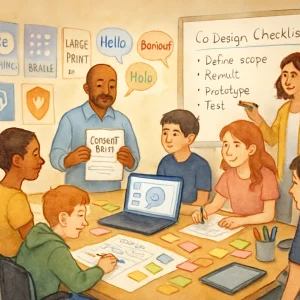
Quick orientation: this topic gives you practical methods to bring young people and teachers into designing, testing and choosing AI tools that affect their learning, health and wellbeing. It’s focused on being inclusive, respectful and actionable — whether you’re making a classroom app, an SEL chatbot, a sexuality education tool, or policy recommendations.
What you’ll get here
- Why participatory design with youth and teachers matters
- A step‑by‑step co‑design process you can reuse
- Activities, scripts and templates for workshops and testing
- Safeguarding, consent, privacy and accessibility guidance
- Ways to measure and institutionalize participation
Tone: practical, classroom-friendly and safety‑minded.
Why do inclusive, participatory approaches matter?
- Relevance: Young people and teachers know the real classroom context. They surface needs you’d never spot from a distance.
- Respect & agency: Involving people affected by a tool treats them as partners, not subjects.
- Usability & safety: Co‑design catches harms early (biases, unclear language, harmful prompts).
- Legitimacy & trust: Policies and systems co‑created with stakeholders get more buy‑in and are easier to implement.
Think of participation not as a “nice to have” but as risk mitigation and quality assurance.
High‑level co‑design process (9 steps)
- Define scope & goals (who, what, outcomes)
- Identify stakeholders & recruit participants
- Prepare materials & adapt to accessibility needs
- Build trust & run icebreaker activities
- Explore problems together (research phase)
- Ideate & co‑create prototypes
- Test with real users (think‑aloud, pilot)
- Analyze, iterate, and close the feedback loop
- Institutionalize: advisory boards, governance, ongoing evaluation
Below you’ll find a practical breakdown with tools, templates and sample agendas for each step.
1. Define scope & goals
Before you recruit, be crystal clear:
- Who are the primary users (age range, language, special needs)? Who are secondary users (teachers, caregivers)?
- What decisions will participants influence? (user interface, content, data policies, escalation flows)
- What outcomes matter? (safety, comprehension, wellbeing, equity)
- What constraints exist? (budget, tech platforms, legal/regulatory limits)
Outcome: short one‑page brief that you can share with participants so they know what to expect.
2. Recruit thoughtfully
Recruitment principles
- Aim for genuine diversity: age, gender, disability, socioeconomic background, digital access, geography, learning needs.
- Prioritize under‑represented voices — those most impacted by the tool.
- Compensate participants fairly (gift cards, honoraria, travel reimbursement).
- For minors, follow local rules: parental consent may be needed; always think in terms of assent + guardian permission.
Sample recruitment message (short)
Hi — we’re building a learning tool about [topic]. We’re running a short 2‑hour co‑design workshop on 2026 and would love to hear from students aged [X–Y] and teachers. Participants will receive [compensation]. If you’re interested, fill this one‑minute form [link].
Consider using schools, youth orgs, teacher networks, and community centers to recruit. Avoid only taking volunteers from tech‑savvy schools — that skews results.
3. Prepare materials and accessibility
Accessibility checklist
- Plain language and multiple languages
- Multiple modes: verbal, written, visual, tactile
- Captioning and transcripts for online sessions
- Large‑print and screen reader friendly documents
- Sensory sensitivity: quiet rooms, breaks, low‑stimulus activities
- Time flexibility and alternative schedules
Prep templates
- Short project brief (1 page)
- Participant info and consent/assent forms (age‑appropriate language)
- Workshop agenda with clear timings and breaks
- Visual aids, stickers, printed cards for in‑person work
- Digital boards (Miro/Jamboard) with simple instructions for remote sessions
Tip: run a mini accessibility audit with at least one participant who uses assistive tech.
4. Build trust and set norms
Start every session by:
- Naming the purpose and what participants will (and won’t) decide
- Sharing who has access to data and how it will be used
- Asking co‑created ground rules (respect, confidentiality, stepping back/forward)
- Emphasizing voluntary participation and how people can stop at any time
Icebreaker idea (10 minutes)
- “Two things about me”: each participant shares a thing they like and a thing they wish a classroom tool did differently. Low pressure, quick insights.
Safeguarding
- Train facilitators in trauma‑informed approaches.
- Have a safe person (school counselor or designated staff) on call when working with young people on sensitive topics like health or sexuality.
- Immediately stop or alter activities if any participant becomes distressed.
5. Explore problems with generative research
Goal: understand lived experiences, not just opinions.
Methods
- Storytelling / diaries: ask youth to record 2–3 days of interactions with learning tech or social platforms.
- Shadowing / classroom observation: see workflows, constraints, tech gaps.
- Cultural probes: give participants a “kit” (photo prompts, diary, disposable camera) to reveal routines.
- Empathy mapping: teams map what users say, think, do, and feel during a task.
Sample question prompts (youth)
- Tell me about a time a tool made you feel heard — what did it do?
- Describe when a lesson or app made you confused or uncomfortable.
- How would you explain privacy to a friend?
For teachers
- Walk me through a typical lesson and where tech fits.
- What adaptations do you make for different learners?
- What policies or budget constraints shape your choices?
Data capture
- Use audio/video only with consent. Offer non‑recorded alternatives.
- Store data securely and delete identifiable materials per policy.
6. Ideation and co‑creation activities
Make it low‑stakes, playful, and visual.
Activities
- Personas & anti‑personas: co‑create characters that represent real students, including edge cases.
- Journey mapping: map a learner’s day interacting with the tool; highlight friction and emotional highs/lows.
- Card sorting: prioritize features or content pieces.
- Wizard‑of‑Oz prototyping: simulate an AI response manually to see user reaction before building algorithms.
- Role‑play: teachers role‑play a lesson using a mock tool to surface classroom dynamics.
Workshop agenda (90–120 minutes)
- 10 min: welcome + norms
- 15 min: empathy mapping / storytelling
- 20 min: persona creation (small groups)
- 25 min: rapid prototyping (paper or whiteboard)
- 20 min: gallery walk + feedback
- 10 min: closing + next steps
Materials
- Paper, markers, sticky notes
- Preprinted prompts, iconography for features
- Low‑fi prototyping kits (cardboard, printouts, tablets)
Facilitation tips
- Assign youth and teacher pairs where possible.
- Keep small groups (4–6 people) so all voices are heard.
- Use visual timers and clear instructions for each activity.
7. Test with users (usability & safety testing)
Types of testing
- Think‑aloud usability tests: participant narrates while using a prototype.
- Scenario tests: give users specific tasks (e.g., “Find help for bullying content”) and measure outcomes.
- Pilot in classrooms: small-scale trials across diverse settings.
- Longitudinal diary studies: track interactions over 1–2 weeks to see longer‑term effects.
Sample usability script (10–20 minutes per participant)
- Quick intro: explain you’re testing the prototype, not them.
- Task 1: “Sign in and find a lesson about X.” Observe where they get stuck.
- Task 2: “Ask the tool for help with Y.” Note clarity, tone, privacy concerns.
- Debrief: “What did you like? What worried you? What would you change?”
Collect both quantitative and qualitative data:
- Time on task, task success rate
- Error types, confusion points
- Emotional impact: scales or quick emojis
Safeguards during testing
- Avoid exposing participants to unsafe content
- Prepare escalation steps if sensitive issues arise (e.g., referral to counselor)
8. Analyze, iterate and close the loop
Analysis checklist
- Synthesize themes: usability issues, safety risks, inclusivity gaps
- Tag feedback by severity and feasibility (critical, important, nice‑to‑have)
- Revisit personas and journeys with updated insights
Iterate quickly
- Fix critical safety/usability issues before wider rollout.
- Keep prototypes small and test each change.
Closing the loop
- Share outcomes with participants: what changed and why (transparency builds trust).
- Offer participants the chance to review near‑final versions.
- Maintain an email or message channel to report bugs or harms during pilots.
9. Institutionalize participation
Sustainable approaches
- Create a Youth Advisory Board and Teacher Panel with regular meetings (monthly/quarterly).
- Build participation into product roadmaps and policy cycles — set standards for when input is required.
- Fund ongoing compensation for community input (not one‑off token payments).
- Publish short, accessible reports on findings and decisions.
Governance features to include
- Clear roles and decision rights (what participants advise on vs what product teams decide)
- Data stewardship agreements
- Mechanisms for grievance and escalation
Ethical, legal and data considerations
Consent & assent
- For minors: obtain guardian permission and youth assent. Use age‑appropriate language.
- Be explicit about what is recorded, who sees it, and how long it’s stored.
Privacy best practices
- Collect the minimum data necessary.
- Anonymize or pseudonymize data as early as possible.
- Protect transcripts, recordings and logs with encryption and limited access.
- Be transparent about use of participant data to train algorithms.
Regulatory flags
- COPPA (US) and similar laws restrict data collection for children under certain ages.
- GDPR has special protections for minors in the EU; follow local requirements.
- School data policies may limit what can be collected on school devices.
Minimize risk from the tool itself
- Pre‑filter or flag content for sensitive topics like self‑harm, sexual content, or medical advice.
- Avoid over‑trusting automated suggestions; include escalation and human oversight.
Accessibility, inclusion and trauma‑informed facilitation
Inclusive facilitation principles
- Create multiple ways to participate (drawing, typing, speaking).
- Allow private feedback channels for sensitive issues.
- Offer breaks and avoid pressure to disclose personal experiences.
Trauma‑informed tips
- Use trigger warnings for sensitive activities.
- Let participants opt out of specific questions.
- Have mental health resources ready and a clear plan if someone needs support.
Language and cultural responsiveness
- Translate materials and run sessions in participants’ preferred languages.
- Avoid assumptions about family structure, identity, or norms.
- Use culturally relevant examples and scenarios.
Sample documents & templates
- Participant information and assent (short, plain language)
- What we’re doing, how long, what participants will do.
- What data we collect and why.
- How we’ll protect privacy.
- Who to contact with questions.
- Statement: participation is voluntary and can stop anytime.
- Short recruitment message (editable)
- See the “Recruit” section above.
- Consent script for workshop (read aloud)
- Hi everyone. Today we’re testing ideas for a [learning tool]. You can say pass at any time. We’ll be recording audio for notes only — check the consent form if you don’t want to be recorded. Anything you tell us might be used to improve the tool. If anything feels uncomfortable tell [facilitator name] and we’ll stop or change the activity.
- Usability test scoring rubric (simple)
- Task success: 0 (failed), 1 (partial), 2 (complete)
- Time on task: <expected / >expected
- Confusion points: note timestamp and description
- Emotional reaction: -2 (very negative) to +2 (very positive)
- Safety flag: yes/no (if yes, describe)
Common pitfalls and how to avoid them
Pitfall: Tokenism — asking for input but ignoring it
- Avoid by defining clear decision paths and reporting back what changed.
Pitfall: Recruiting only “easy” participants
- Avoid convenience bias by partnering with diverse community organizations.
Pitfall: Overloading young people with sensitive questions
- Use vignettes rather than personal disclosure; provide opt‑outs.
Pitfall: Treating teachers and youth the same in activities
- Their roles differ. Mix joint and separate sessions so each group can speak freely.
Pitfall: Forgetting to compensate
- Budget for fair payments from the start.
Example mini case: Designing a supportive chatbot for SEL
- Scope: chatbot to support mood check‑ins (ages 13–16).
- Recruit: 12 students from 3 schools + 6 teachers; ensure language and disability representation.
- Prep: run a trauma‑informed training for facilitators; prepare a safe person contact for each school.
- Workshop 1 (explore): empathy mapping and storytelling — find triggers, comforting language.
- Workshop 2 (co‑create): rapid prototype chatbot scripts using cards (“if a user says X, how should the chatbot respond?”).
- Wizard‑of‑Oz test: facilitators respond in real time to 12 youth in 1:1 sessions; record reactions and revise scripts.
- Pilot: small classroom rollouts for 2 weeks; logs anonymized and reviewed daily for safety flags.
- Iterate: change language tone, add escalation to counselor when self‑harm keywords appear.
- Formalize: create a Youth Advisory Panel to review periodic updates and content changes.
Quick reference: tools & platforms
- Collaboration: Miro, Jamboard, FigJam
- Prototyping: Figma (low‑fi to hi‑fi), paper prototyping kits
- Surveys: Google Forms, Typeform (with privacy controls)
- Testing: Lookback, UserTesting, manual think‑aloud
- Accessibility checks: WAVE, axe
- Secure storage: encrypted drives, access‑controlled cloud storage
Metrics to evaluate participation impact
- Representation: % participants reflecting target diversity
- Influence: % of participant suggestions implemented
- Usability: task success rate, SUS (System Usability Scale)
- Wellbeing: pre/post brief wellbeing scale (validated short form)
- Safety incidents: number and severity, time to remediation
- Trust: qualitative indicators, willingness to recommend
Final tips — practical, simple, and human
- Start small and iterate: you don’t need perfect governance on day one, but you do need safe processes.
- Compensate and value people’s time.
- Be transparent: say what you’ll do with input, and stick to it.
- Listen more than you speak. Let youth finish sentences and teachers explain constraints.
- Close the loop visibly: show participants what changed because of them.
If you’d like, I can:
- Draft a 90‑minute workshop agenda tailored to a specific age group (e.g., 11–13 vs 15–17).
- Create editable templates for consent, recruitment, and the usability rubric.
- Provide quick scripts for Wizard‑of‑Oz testing or a youth advisory board charter.
Which would help you most right now?
