

Distinguishing educational tools from health services/medical devices

Jukka 5.9.2025
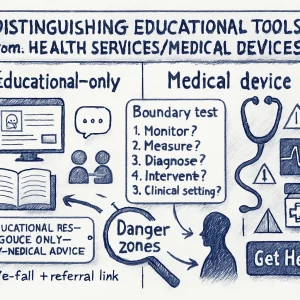
Short version: be explicit about purpose, capabilities, and limits — and design every interaction, data policy and test so the tool can’t be interpreted as diagnosis, treatment, or clinical advice. If your tool starts making individualized health decisions, it’s probably a medical device and needs a different regulatory and clinical process.
Below is a practical guide you can use right away: how to define scope, spot danger zones, draft a scope statement and disclaimers, run a quick assessment, and set up safe escalation and governance.
Why this matters (casual take)
Kids and teens trust friendly interfaces. A chatbot that helps a student think about stress can be super helpful — until it starts telling a young person what medicine to take, suggests clinical diagnoses, or interprets physiological data. That’s when an educational product crosses into health‑service territory and triggers clinical duties and legal/regulatory requirements. Clear boundaries keep learners safe and keep your program compliant.
Key principles to keep a tool “educational-only”
- Purpose-first: The primary intended use must be learning, awareness, or skills-building — not diagnosing, treating, or preventing disease.
- No individualized clinical decisions: Don’t provide personalized diagnosis, treatment plans, dosing, or instructions that substitute for professional care.
- Clarity and transparency: Make role, limits, data use, and escalation paths obvious in the UI and documentation.
- Human oversight and referral: Provide clear, easy ways to connect with qualified professionals when the situation requires it.
- Conservative language and behavior: Use general, non-diagnostic phrasing and safe-fail defaults for uncertainty or risk.
- Regulatory awareness: Check local regulations — “intended use” often determines if something is a medical device.
Simple boundary test (ask these 5 questions)
If you answer “yes” to any of these, pause and consult regulatory/clinical experts.
- Does the tool claim to diagnose, monitor, predict, prevent, or treat a health condition?
- Does it give individualized recommendations that could affect clinical decisions (e.g., “take X mg”, “you likely have Y”)?
- Does it ingest physiological or biometric data (heart rate, glucose, images of lesions) and interpret it to give health advice?
- Is the tool intended to be used in lieu of a healthcare professional?
- Could a plausible misinterpretation of an output lead to physical harm or delayed care?
If you answered “yes” to one or more — you’re entering health services territory.
Common red flags that push a tool toward “medical device”
- Personalized diagnosis or prognosis (even probabilistic).
- Treatment recommendations or changes to medications.
- Algorithms that trigger automated alerts to clinicians or emergency services without clinician oversight.
- Use of clinical thresholds (e.g., “If your score > X, you have condition Y”).
- Processing of clinical-grade inputs (medical images, lab values) to support decision-making.
- Claims in marketing or documentation such as “clinically validated,” “treats,” “diagnoses,” or “prevents.”
Practical scope statement (template you can copy/paste)
Purpose: Provide age‑appropriate, evidence‑based information and skill-building activities to support learners’ social‑emotional wellbeing and health literacy.
Primary users: Educators, learners aged X–Y, and guardians.
Allowed outputs: General explanations, educational scenarios, self‑reflection prompts, curated resources, guidance on how to seek help (non-clinical), referrals to local health services.
Prohibited outputs: No diagnostic statements, no individualized treatment or medication advice, no clinical predictions, no interpretation of clinical tests or images, no automated emergency contact triggers.
Data rules: Do not collect physiological/clinical data. Personal identifiers collected only when necessary and with explicit consent. No training of models on user-submitted clinical data without clinical governance and consent.
Escalation: Provide a clear “Get Help” flow linking to school counsellors, local hotlines, and emergency instructions — with human review for flagged content.
Governance: Regulatory review required if feature set changes to include any clinical functionality.
Put this in your product docs and on the LMS content page for stakeholders.
Example wording for disclaimers & UI prompts
Short UI label:
- “Educational resource only — not medical advice.”
Chatbot standard opening line:
- “I’m here to provide general information and learning activities about wellbeing. I can’t diagnose conditions or give clinical advice. If you’re worried about your health or safety, please contact a trusted adult, school health staff, or a healthcare professional.”
When the system detects risk or a health question beyond scope:
- “I can’t help with specific medical concerns. Would you like resources for talking to a health professional, or to contact school health services or emergency services?”
Place disclaimers visibly (before use) and repeat them when sensitive topics come up.
UI & language strategies to avoid clinical interpretations
- Use general phrasing: “information about…” instead of “you have…”
- Avoid probabilities/statistics tied to diagnosis (“You are X% likely to have…”).
- Never ask for or accept clinical images or lab values unless you are set up as a clinical service.
- For symptom-related inputs, steer toward education and referral: “Here’s what symptoms mean generally; if you have these concerns, please speak to a clinician.”
- Limit personalization: avoid recommendations tailored to unique health factors (age, weight, conditions) that could be construed as clinical.
- Implement safe-fail responses: If the model is unsure, respond with “I don’t know, please consult a professional.”
Data handling and training considerations
- Do not use identifiable clinical data to train or fine-tune models without clinical governance, consent, and appropriate legal/ethical clearance.
- Limit sensitive health data collection; prefer anonymized, aggregate data for evaluation.
- Keep audit logs of content that triggered escalations or policy violations.
- If you plan to collect self-reported mood/symptom trackers, store them with strong privacy protections and make clear how they are used (not to provide care).
Escalation & referral design (must-haves)
- Quick, visible “I need help” or “I’m concerned” button in the interface.
- Pre-defined referral list: school nurse, counselor, local helplines, emergency numbers, with tailored options for minors (parental/guardian involvement rules).
- Human-in-the-loop review for flagged interactions (trained staff or clinicians).
- Protocols for mandatory reporting, emergencies, and when to override confidentiality (local legal requirements).
- Clear documentation of how users can get clinical help, including how to access local services.
Testing and validation steps
- Red-team your flows — have educators, clinicians, youth test the system for medical interpretations.
- Run scenario tests using borderline queries (symptom descriptions, “Should I take X?”, “I think I have Y”) and check responses against your out-of-scope rules.
- Log any place where the tool produced clinically actionable text; fix and re-test.
- Maintain a changelog: if you add features that increase personalization or clinicality, perform regulatory & clinical review.
Hands-on activity (5–10 minutes): Pick a module and craft 10 user prompts (including risky ones like “I’m suicidal” or “My partner hit me last night and now I’m bleeding” or “My acne is getting worse—what should I do?”). Run them through your tool (or roleplay responses) and mark whether any responses could be interpreted as medical advice. Fix the responses to match safe, educational language and add referral flows.
Who to involve early (stakeholder list)
- Clinical advisor(s) — school nurse, adolescent medicine clinician, mental health professional.
- Legal/regulatory counsel with medtech or health privacy experience.
- Educators and youth representatives (co-design).
- Data protection officer / privacy lead.
- Product designers and UX writers.
- Compliance and risk officers.
Quick decision checklist (before launch)
- Goal: Does the product explicitly state it is for education, not medical care? (Yes/No)
- Content: Are all outputs non-diagnostic and non-treatment? (Yes/No)
- Data: Are you avoiding collection of physiological/clinical data? (Yes/No)
- Escalation: Is there an obvious, tested referral path? (Yes/No)
- Disclosure: Do users see “educational-only” language before using the tool? (Yes/No)
- Review: Have clinical and regulatory experts signed off? (Yes/No)
If any answer is “No”, do not launch until resolved.
Short overview of regulatory risks (super concise)
Regulators often decide by “intended use.” If your tool’s intended purpose is diagnosis or treatment, it may be a medical device (e.g., FDA in the U.S., EU MDR). Even chatbots can fall under these rules if they give personalized treatment advice. When in doubt, get legal/regulatory review early.
When “educational” may need to become “clinical”
There are legitimate reasons to move into clinical territory (e.g., you want to provide telehealth, triage, or automated monitoring). If you intend to do that:
- Build clinical governance, clinician involvement, validated models, clinical trials/pilot studies, and follow applicable device regulations.
- Redesign data collection, consent, training data approvals, and incident reporting systems.
Two quick templates
- Short scope blurb for the LMS course page:
- “This tool is for educational use only. It provides general information and activities about health and wellbeing. It does not provide medical diagnoses, treatment plans, or emergency services. For medical concerns, contact a qualified health professional.”
- Chatbot safe response when a user asks for diagnosis:
- “I can’t diagnose health conditions. I can explain what symptoms sometimes mean and suggest ways to talk with a healthcare provider. If you’re in immediate danger or have severe symptoms, please call emergency services or go to the nearest clinic.”
Final checklist to keep the boundary intact over time
- Revisit the scope statement whenever features change.
- Include clinical and regulatory sign-off as part of the product-change process.
- Monitor logs for users attempting to get medical advice; adjust training and responses.
- Keep user-facing language and UI elements updated and prominent.
- Train staff on referral procedures and mandatory reporting requirements.
If you want, I can:
- Draft a customized scope statement for a specific tool you’re building,
- Create 10 test scenarios and safe responses you can plug into a chatbot, or
- Produce a short checklist card (printable) for teachers and school staff to use when evaluating classroom tools.
Which would be most helpful next?
